
- WireGuard is now a Remote User Access option on Peplink routers (Firmware 8.6), alongside OpenVPN and L2TP.
- IPsec gains SHA2-384; preshared keys under FIPS must be ≥14 characters.
Part Twenty: WAN Link Types
The topic
The WAN (Wide Area Network) is how a site connects beyond its own walls, to other sites, to the internet, to the cloud. The link types differ in speed, cost, reliability, and how they fail:
- Fiber offers the highest capacity and reliability where available, but installation can be slow and costly, and it is still a single physical path that a backhoe can cut.
- Cable and DSL are inexpensive, widely available wired broadband, good capacity downstream, less upstream, shared infrastructure.
- Fixed wireless and 5G/LTE deliver connectivity over the cellular network, now reaching speeds in the hundreds of megabits, with the huge advantage of sharing none of the wireline infrastructure, so they fail independently of it.
- Satellite, especially modern low-earth-orbit (LEO) services like Starlink, now offers genuinely usable latency (roughly 20-45 ms) and high throughput, making it a real working link for remote, mobile, or backup roles rather than a last resort.
- MPLS is the legacy private circuit: reliable and predictable, but expensive, slow to provision, and tied to one carrier.
WAN link types compared
| Link | Typical speed | Latency | Cost | Fails independently of | Best role |
|---|---|---|---|---|---|
| Fiber | 100 Mbps – 10 Gbps+ | Very low (1–5 ms) | $$ | — | Primary where available |
| Cable | 100 Mbps – 1 Gbps down | Low (10–30 ms) | $ | Fiber path | Primary or strong secondary |
| DSL | 10 – 100 Mbps | Low–medium | $ | Cable plant | Backup, rural |
| 5G / LTE | 50 Mbps – 1 Gbps+ | Low–medium (20–40 ms) | $$ | All wireline | Backup, mobile, no-wire sites |
| LEO satellite (Starlink) | 100 – 300 Mbps | 20–45 ms | $$ | All terrestrial | Remote, mobile, diverse backup |
| GEO satellite (legacy) | 5 – 50 Mbps | Very high (~600–800 ms) | $$$ | All terrestrial | Last resort only |
| MPLS | Fixed (e.g. 50 Mbps) | Low, guaranteed | $$$$ | Nothing (single carrier) | Legacy private WAN |
Latency rule-of-thumb reference (one-way / round-trip feel)
| Range | Feels like | Fine for |
|---|---|---|
| < 20 ms | Instant | Anything, including real-time trading |
| 20–50 ms | Excellent | Voice, video, gaming, everything normal |
| 50–100 ms | Good | Voice and video still fine |
| 100–150 ms | Noticeable | Voice usable; the ITU one-way ceiling for good voice is ~150 ms |
| 150–300 ms | Laggy | Tolerable for web/streaming, poor for live conversation |
| > 300 ms | Painful | Legacy satellite territory; avoid for interactive use |
How it is generally implemented
Historically a site had one WAN link, occasionally a second as cold standby. The link type was chosen by what was available and affordable at that location. The modern approach is to combine several diverse link types deliberately, so the site is never dependent on any single one.
Why it matters
The WAN link is now the most important connection a site has, because in a cloud world almost everything important travels over it. Yet it is also the most common single point of failure. The whole argument for diverse, redundant WAN connectivity rests on understanding that these link types fail in different ways and for different reasons, so combining them produces resilience that no single link, however premium, can match.
In an SD-WAN world
This is SpeedFusion’s home ground. SD-WAN bonds these diverse links, fiber, cable, 5G, satellite, into one logical connection that is faster and far more resilient than any single one. The key is that the links fail independently: a cut fiber, a congested tower, and bad weather over the satellite are unrelated events, so the combination stays up through any one of them. This is how West Networks delivers reliability using ordinary, inexpensive connections instead of a single premium circuit.
Part Twenty-One: VPNs, Client-to-Site and Site-to-Site
The topic
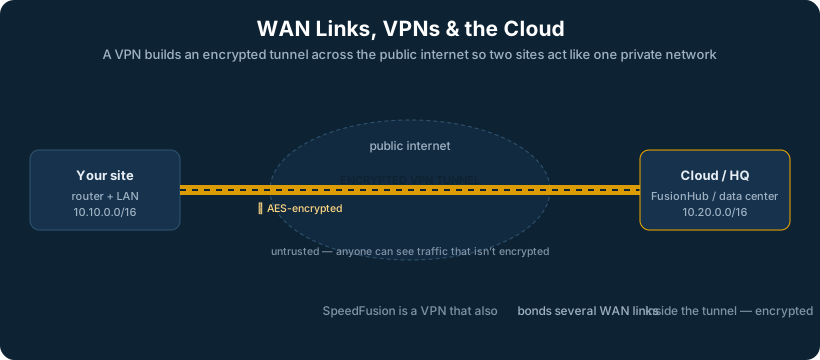
A VPN (Virtual Private Network) creates a secure, encrypted tunnel across an untrusted network (usually the internet), so traffic can travel as if it were on a private link. There are two fundamental topologies:
- Client-to-site (remote access) VPN connects an individual user’s device back to the corporate network, the remote worker’s laptop tunneling into headquarters. It secures one endpoint at a time.
- Site-to-site VPN connects entire networks to each other, the branch office permanently tunneled to headquarters, so all devices at both sites can communicate as if on one network, with no per-user software.
Site-to-site VPNs are further described by their topology: hub-and-spoke (every site tunnels back to a central hub, simple but the hub is a chokepoint and single point of failure) or full mesh (every site connects directly to every other, resilient and efficient but complex to manage as the number of sites grows).
How it is generally implemented
Traditional VPNs use protocols like IPsec to encrypt and authenticate the tunnel. Client VPNs require software on each device and a concentrator at the network edge. Site-to-site tunnels are configured between the edge devices at each location. The classic pain points are managing many tunnels, handling failover when a link drops (a standard IPsec tunnel does not gracefully survive a WAN failure), and the configuration burden of a growing mesh.
Why it matters
VPNs are how distributed organizations function securely, connecting branches, enabling remote work, reaching cloud resources privately. But traditional VPNs have a serious weakness: they are tied to a single WAN path, so when that link degrades or drops, the tunnel and everything riding it goes with it. The session does not survive; the call drops, the transfer fails.
In an SD-WAN world
This is one of SpeedFusion’s clearest advantages. A SpeedFusion tunnel is not bound to a single link, it rides the bonded combination of all available links, so it survives the failure of any one of them without dropping the session. It also collapses the management problem: instead of hand-building and babysitting a mesh of fragile IPsec tunnels, sites join a centrally managed SD-WAN fabric that handles the topology and the failover automatically. It is the VPN concept, made resilient and manageable at scale.
Part Twenty-Two: The Cloud, What It Is and Why It Matters
The topic
“The cloud” simply means computing resources, servers, storage, applications, that run in someone else’s data center and are accessed over the internet, rather than on equipment you own and house. It comes in layers: SaaS (software as a service, like Microsoft 365 or Salesforce, you just use the application), PaaS (a platform to build on), and IaaS (raw virtual infrastructure you manage yourself). For most businesses, the visible reality is SaaS: email, files, line-of-business applications, all now living in the cloud instead of on a server down the hall.
How it is generally implemented
Organizations connect to the cloud over their internet connection, sometimes augmented with dedicated links to specific cloud providers for performance or security. Identity and access are managed centrally so users can reach cloud apps securely from anywhere. The on-premise footprint shrinks to the network itself, the devices, and whatever must remain local.
Why it matters
The migration to the cloud is the single biggest change in enterprise networking in a generation, and it rewrites the assumptions every older network was built on. When the servers were in the building, the network’s job was to move traffic efficiently inside the building, which justified the powerful core switch. When the servers move to the cloud, the dominant traffic flow reverses: it now goes outward, to the internet, which makes the WAN connection, not the core, the most critical part of the network. Almost everything in this document that “changes in an SD-WAN world” changes because the cloud emptied the building.
In an SD-WAN world
If the cloud is where the work now lives, then the connection to it is the lifeline, and a single connection is an unacceptable risk. SD-WAN exists to make that lifeline reliable: bonded diverse links so the path to the cloud never fully fails, intelligent steering so each cloud application gets the best path, and security applied at the edge as traffic leaves for the internet. The cloud is the reason the New Enterprise network is built around the edge and the WAN rather than the core, and SD-WAN is how that edge is made dependable.
Part Twenty-Three: Management and Monitoring
The topic
A network you cannot see is a network you cannot run. Management and monitoring are how engineers know what is happening across their infrastructure. The classic tools include SNMP (a protocol devices use to report their status and statistics), syslog (a standard way for devices to send log messages to a central collector), and NetFlow or similar (which reports on traffic flows, who is talking to whom and how much). On top of these sit dashboards and alerting systems that turn raw data into a picture of network health and a warning when something degrades.
How it is generally implemented
Devices are configured to send their metrics and logs to a central monitoring platform. Thresholds and alerts are set so that a failing link, a saturated interface, or a downed device generates a notification, ideally before users notice. Increasingly, management is cloud-based and centralized: one console that shows and controls every device across every site, rather than logging into each device individually.
Why it matters
When a single building holds the whole network, you can walk it. When the network spans dozens or hundreds of distributed sites, central visibility is the only way to operate. The difference between a problem you fix in minutes and an outage that costs a day is usually whether your monitoring told you what failed, where, and when, or whether you found out from an angry phone call and had to start investigating from zero.
In an SD-WAN world
Centralized management is built into the SD-WAN model rather than bolted on. Peplink’s InControl provides a single pane of glass across every device and every site, showing the health and performance of every link in real time and allowing configuration to be pushed centrally. This is what makes the visibility and accountability pillars of a modern distributed network achievable, you manage a thousand edges the way you used to manage one, because the intelligence and the view live in one place.
Part Twenty-Four: A Detail That Bites Everyone, MTU and MSS
The topic
MTU (Maximum Transmission Unit) is the largest size a single packet can be on a given link, typically 1500 bytes on standard Ethernet. MSS (Maximum Segment Size) is the related limit on the data portion of a TCP segment. When traffic is encapsulated, as it is inside a VPN or SD-WAN tunnel, the extra headers consume some of that space, so the effective MTU inside the tunnel is smaller than on the raw link.
How it is generally implemented
Networks either allow path MTU discovery to work (so endpoints learn the right size automatically) or, very commonly, clamp the MSS at the tunnel edge to a safe value so traffic fits without fragmentation. On Peplink and most SD-WAN gear, MSS clamping on tunnel interfaces is a standard setting.
Why it matters
MTU and MSS mismatches cause some of the most maddening problems in networking: connections that establish fine but then hang, web pages that load partially, file transfers that stall, all while ping (which uses small packets) works perfectly, sending engineers chasing the wrong cause for hours. It is a small topic that punches far above its weight in real-world troubleshooting, especially anywhere tunnels are involved.
In an SD-WAN world
Because SD-WAN encapsulates traffic in tunnels, MTU/MSS handling matters here more than almost anywhere. Well-designed SD-WAN platforms handle it sensibly by default, but knowing it exists is what lets an engineer instantly recognize the symptom, “ping works but real traffic hangs through the tunnel”, and fix in minutes what could otherwise consume a day.