
⚠ SpeedFusion Connect (SFC) limits are NOT SpeedFusion limits
SpeedFusion is the bonding & hot-failover engine built into your Peplink device. It is perpetual — there is no subscription on it, and your own device-to-device tunnels (site-to-site, or to your own FusionHub) keep running no matter what.
SpeedFusion Connect (SFC) is Peplink’s public, hosted bonding service — shared bonding endpoints in Peplink’s cloud. Any limit, data quota, expiration date, or renewal notice you see applies to your access to that public SFC service — not to SpeedFusion itself. If an SFC plan lapses, SpeedFusion still works; you only lose the public endpoints.
The dashboard is the screen you check first when anything is reported wrong. It shows every WAN connection, its priority, its public IP, and live status, plus the LAN, the Wi-Fi AP, and the state of every SpeedFusion tunnel.
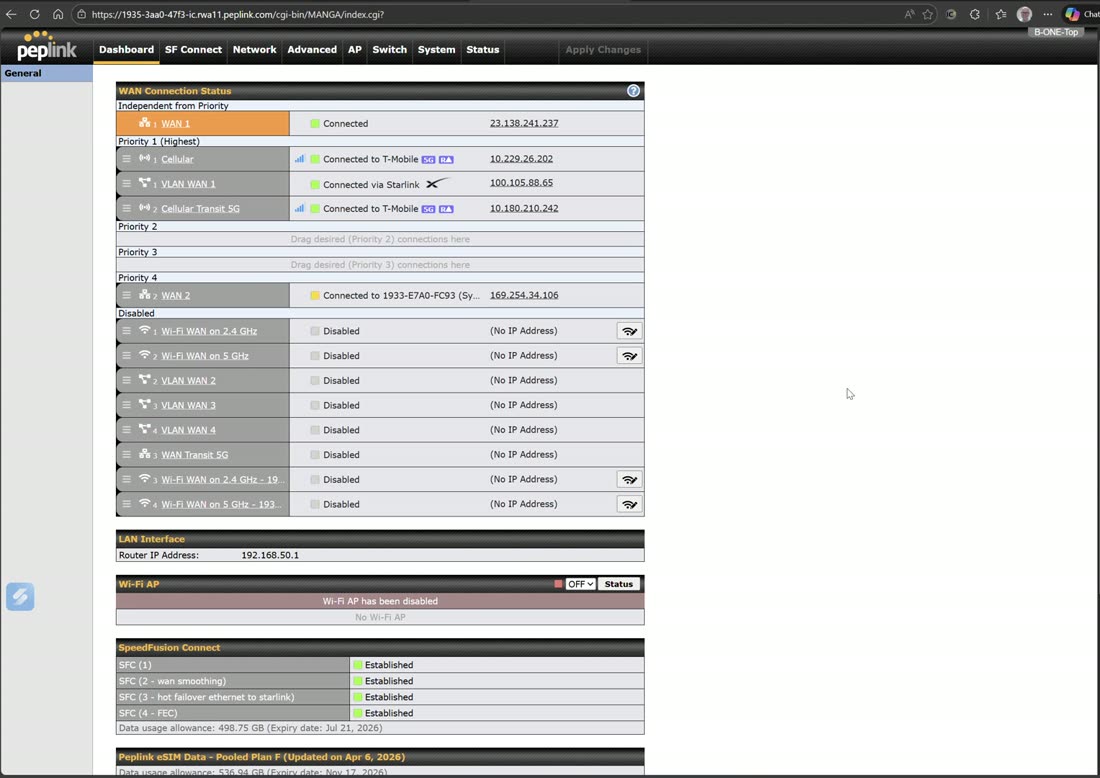
Same interface, local or remote
You reach this dashboard the same way whether you are on-site or not. Log in locally at the router’s LAN IP (for example 192.168.5.1), or log in remotely through InControl — it is the identical web UI either way.
WAN Connection Status
Connections are grouped by priority. A connection marked Independent from Priority (Always On) stays up regardless of the failover state of the priority groups — it sits above the priority scheme, so it is useful for a link you always want active. Priority 1 is your primary group; Priority 2, 3… are standby tiers. Each row shows the connection type, its state, and its IP.
Every kind of WAN a Balance can carry shows up here side by side:
- Ethernet WAN — wired uplinks such as fiber on WAN 1.
- Cellular WAN — built-in modems, and cellular brought in from a synergized router (for example a Transit Pro E with a 5G chipset synergized in as WAN 2).
- VLAN-as-WAN — a LAN port converted into a WAN.
- Wi-Fi WAN — upstream Wi-Fi networks used as WANs, including Wi-Fi WANs and Wi-Fi LANs pulled in from a synergized router.
The rest of the dashboard
- LAN Interface — the router’s LAN IP (your gateway).
- Wi-Fi AP — on/off and status of the built-in access point.
- SpeedFusion Connect — every tunnel and whether it is Established. A typical setup shows several at once: a primary bonding tunnel, a WAN-smoothing tunnel, a hot-failover tunnel, and an FEC (forward-error-correction) tunnel.
- Peplink eSIM — pooled eSIM data that was purchased and is pulled from InControl.
- Device / firmware — the running router firmware.