
- Firmware 8.6 is a security release at heart: permanent FIPS, modern-certificate enforcement, RadSec for Wi-Fi RADIUS, and multiple closed vulnerabilities (including a CLI command-injection flaw). If you run Peplink gear, upgrade.
Part Seventeen: Firewalls, Rules, Policies, and Traffic Shaping
The topic
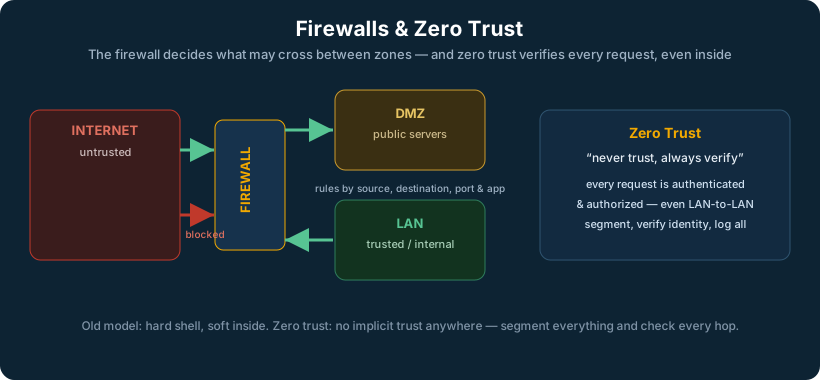
A firewall enforces what traffic is allowed where. Its rules fall into two broad directions. Inbound rules control traffic coming from the outside toward your network, by default, deny everything, and explicitly permit only what must be reachable (a published web server, a VPN endpoint). Outbound rules control traffic from inside going out; historically networks allowed all outbound traffic, but modern security increasingly restricts it, because controlling what leaves is how you contain malware and data exfiltration.
A modern firewall is stateful: it tracks the state of each connection, so when an internal device starts a conversation, the firewall automatically allows the return traffic without needing a separate rule, while still blocking unsolicited inbound attempts. On top of filtering, firewalls and edge devices perform traffic shaping (also called QoS), deliberately prioritizing important traffic and limiting less important traffic so that, for example, a large download cannot starve a video call.
How it is generally implemented
Rules are written most-specific-first and evaluated in order, ending in an implicit deny. Good practice is least privilege: permit exactly what is needed and nothing more, in both directions. Segmentation (via VLANs and subnets) is what gives the firewall meaningful boundaries to enforce, between guest and corporate, between user and server, between trusted and untrusted zones. Traffic shaping is configured by classifying traffic (by application, port, or source) and assigning each class a priority and bandwidth guarantee or limit.
Well-known ports every engineer should recognize on sight
| Port | Proto | Service | Port | Proto | Service | |
|---|---|---|---|---|---|---|
| 20/21 | TCP | FTP | 443 | TCP | HTTPS / TLS | |
| 22 | TCP | SSH / SCP / SFTP | 445 | TCP | SMB (Windows files) | |
| 23 | TCP | Telnet (avoid) | 500 | UDP | IPsec IKE | |
| 25 | TCP | SMTP (mail send) | 514 | UDP | Syslog | |
| 53 | TCP/UDP | DNS | 587 | TCP | SMTP submission (TLS) | |
| 67/68 | UDP | DHCP | 636 | TCP | LDAPS | |
| 69 | UDP | TFTP | 993 | TCP | IMAPS | |
| 80 | TCP | HTTP | 995 | TCP | POP3S | |
| 123 | UDP | NTP (time) | 1701 | UDP | L2TP | |
| 143 | TCP | IMAP | 1812/1813 | UDP | RADIUS auth/acct | |
| 161/162 | UDP | SNMP / traps | 3389 | TCP | RDP (remote desktop) | |
| 389 | TCP/UDP | LDAP | 4500 | UDP | IPsec NAT-T |
VPN-related ports and protocols (the ones that trip up firewall rules)
| VPN type | Needs | Notes |
|---|---|---|
| IPsec (IKEv1/v2) | UDP 500, UDP 4500, ESP (IP protocol 50) | ESP is a protocol, not a port; NAT-T moves it onto UDP 4500 |
| WireGuard | UDP 51820 (configurable) | Single UDP port, simple to allow |
| OpenVPN | UDP 1194 or TCP 443 | TCP 443 mode blends in with HTTPS |
| L2TP/IPsec | UDP 1701 + the IPsec ports | L2TP alone has no encryption |
Why it matters
The firewall is the enforcement point for nearly all network security policy. Most breaches that spread widely do so because internal traffic was unrestricted, once inside, the attacker moved freely. Disciplined inbound and outbound policy, combined with segmentation, is what turns a flat, brittle network into a defensible one. And traffic shaping is often the difference between a connection that feels fast and one that feels broken under load, even at the same raw bandwidth.
Common DSCP / QoS markings (for traffic shaping and prioritization)
| DSCP name | Value | Typical traffic | Priority |
|---|---|---|---|
| EF (Expedited Forwarding) | 46 | Voice (VoIP / RTP) | Highest, lowest latency |
| CS5 | 40 | Broadcast video | Very high |
| AF41 | 34 | Interactive video / conferencing | High |
| CS4 | 32 | Real-time / streaming | High |
| AF31 | 26 | Mission-critical data, signaling | Medium-high |
| CS3 | 24 | Call signaling (SIP) | Medium-high |
| AF21 | 18 | Transactional / business apps | Medium |
| CS2 | 16 | Network management (OAM) | Medium |
| Default (BE) | 0 | Best-effort, everything else | Normal |
| CS1 | 8 | Scavenger / bulk (backups) | Lowest |
The pattern to remember: voice gets EF (46) and the lowest-latency path; interactive video sits in the AF4x range; bulk and backups get marked down to scavenger so they yield to everything else. SD-WAN devices read these markings (or set them by application) to decide both priority and which link a flow should take.
Bandwidth problem or prioritization problem? How to tell them apart. They feel similar to a user (“it’s slow”) but the fix is completely different, so diagnose before you act. A bandwidth problem means the link is genuinely full: check utilization, if a link is pinned at or near 100% of its capacity during the slowness, you are out of bandwidth, and no amount of QoS creates more, you need a bigger or additional link (or to move the heavy traffic off it). A prioritization problem means there is bandwidth available on average but the important traffic is losing the race to less important traffic in bursts: the link is not constantly maxed, yet voice or a critical app stutters whenever something else (a backup, a big download) kicks off. The tell: if the link is saturated continuously, it is bandwidth; if it is fine until a specific other activity starts and then the important thing suffers, it is prioritization, and QoS/traffic shaping is the right fix. The quick test on a Peplink edge is to watch per-link utilization while the problem happens: flatlined at capacity points to bandwidth, spiky-with-collateral-damage points to prioritization.
Explaining the guest VLAN to a customer who thinks “it’s just Wi-Fi.” Keep it concrete and non-technical: the guest network and the business network share the same internet line, but they should never share the same inside. Without a guest VLAN, every phone, laptop, and unknown device a visitor brings is sitting on the same network as your point-of-sale, your patient records, your cameras, and your staff computers, free to see and potentially reach them. A guest VLAN puts visitors in their own sealed lane: they get internet, and nothing else, no path to your business systems at all. The analogy that lands: it is the difference between giving a guest the wifi password and giving them a key to the whole building. It costs nothing extra and it is the single easiest thing we can do to keep an infected or malicious guest device from becoming your problem. For any business that takes payments or holds sensitive data, it is not optional, it is usually a compliance requirement.
In an SD-WAN world
SD-WAN makes traffic shaping dramatically more powerful, because it can shape across multiple links at once and make per-application decisions about which link to use, not just which to prioritize. A Peplink edge can guarantee a voice call the lowest-latency path while pushing backups across a cheaper, higher-latency link, and enforce firewall policy at the same edge. Security policy and intelligent path selection live in the same device, applied consistently across every site from central management.
How link steering is actually configured (outbound policy rules). This is the question every new engineer asks first: once you have several links, how do you decide what uses which? On a Peplink edge it is done with outbound policy rules, evaluated top-down like firewall rules, where each rule matches traffic (by source, destination, application, or port) and assigns it an algorithm. The algorithms you will use most:
| Algorithm | What it does | Use it for |
|---|---|---|
| Enforced | Locks matching traffic to one specific link | Traffic that must use one circuit (licensing tied to an IP, a regulated link) |
| Priority | Prefers link 1, falls to link 2 only if 1 fails | Simple failover for a service |
| Weighted balance | Splits traffic across links by a set ratio | Spreading general load across unequal links (e.g. 70/30) |
| Lowest latency | Sends traffic to whichever link currently has the least delay | Real-time voice and video |
| Overflow | Fills link 1, spills excess to link 2 | Use cheap bandwidth first, burst to the expensive link |
| Persistence | Keeps a given source or session on the same link | Apps that break if their source IP changes mid-session (banking, some portals) |
| SpeedFusion bonding | Combines links into one tunnel so a single session rides all of them | The “never drops” case: VoIP, video, mission-critical sessions that cannot survive a link change |
The key mental distinction for a new tech: the load-balancing algorithms above choose which link a flow takes (and a flow stays on one link), whereas SpeedFusion bonding lets one flow span multiple links at once and survive any of them failing. You reach for plain outbound policies when you want efficient use of multiple links, and for SpeedFusion when a session simply must not drop. A typical site uses both: bonding for voice and critical traffic, weighted-balance or overflow for everything else.
Part Eighteen: 802.1X and Port-Level / Wireless Authentication
The topic
802.1X is the standard for controlling who and what is allowed onto the network, before they get an address or reach anything. Instead of trusting any device that plugs into a port or connects to Wi-Fi, 802.1X requires the device or user to authenticate first. It involves three roles: the supplicant (the device trying to connect), the authenticator (the switch or access point controlling the door), and the authentication server (typically a RADIUS server that checks credentials against a directory).
How it is generally implemented
On a wired switch, you enable 802.1X on the access ports, and a connecting device must authenticate (by certificate, or username and password, or machine credential) before the port forwards any traffic; until then the port is closed or restricted to a guest/quarantine VLAN. On Wi-Fi, the same mechanism underlies WPA2/WPA3-Enterprise: instead of one shared Wi-Fi password, each user or device authenticates individually against RADIUS, which can also assign them dynamically to the correct VLAN. A common real-world pattern is dynamic VLAN assignment, the authentication server tells the switch which VLAN to place the device in based on who it is.
Why it matters
Without port and wireless authentication, physical access to a network jack or wireless range is effectively access to the network. 802.1X closes that gap, which is essential anywhere untrusted people can reach a port or the airwaves: offices, clinics, schools, public spaces. It is also the backbone of any serious Zero Trust effort, because it establishes device and user identity at the moment of connection.
In an SD-WAN world
In a distributed network of many sites, you want the same strong authentication everywhere without configuring it by hand at each location. A Peplink edge with integrated switching and Wi-Fi can enforce 802.1X consistently across all sites, pointed at central or cloud RADIUS, and managed from one console. Identity-based access at the edge is exactly the foundation the next topic, Zero Trust, builds on.
Part Nineteen: Zero Trust and Network Segmentation
The topic
Zero Trust is a security model that replaces the old idea of a trusted inside and an untrusted outside. The traditional model built a hard perimeter, a firewall at the edge, and largely trusted everything within it. That fails badly in a world where users, devices, and applications are everywhere and an attacker who gets inside can move freely. Zero Trust starts from “never trust, always verify”: no user or device is trusted by default, every access request is authenticated and authorized, and each entity is given access only to exactly what it needs, nothing more.
Two related ideas sit alongside it. Internal vs. external segmentation is the recognition that you must control traffic inside the network (east-west), not just at the border (north-south). A DMZ (demilitarized zone) is the classic example of external-facing segmentation: a separate zone for systems that must be reachable from the internet, isolated so that compromising them does not expose the internal network.
How it is generally implemented
Zero Trust is an architecture, not a product. It is built from the pieces already covered: strong identity (802.1X, multi-factor authentication), fine-grained segmentation (VLANs and subnets), least-privilege firewall policy in every direction, and continuous verification rather than one-time trust. Microsegmentation takes it further, isolating even individual workloads from each other so that a compromise cannot spread.
Why it matters
The perimeter has dissolved. Cloud applications, remote workers, and personal devices mean there is no longer a clean inside to defend. Zero Trust is now mainstream precisely because the old model no longer matches reality. For an engineer, it reframes the whole job: security is not a wall at the edge, it is identity and policy applied everywhere, continuously.
In an SD-WAN world
SD-WAN is a natural enabler of Zero Trust because it puts intelligent, identity-aware, policy-enforcing capability at every edge and ties it to central management. Segmentation defined once is enforced everywhere; traffic between sites rides encrypted tunnels rather than open links; and access decisions are applied consistently across the whole distributed network. The connectivity layer and the security model reinforce each other instead of being separate projects.