
Part One: How the Internet Actually Works
The topic
Before any single network makes sense, you have to understand the thing every network ultimately connects to. The internet is not a cloud in the sky. It is a physical, hierarchical mesh of independent networks that have agreed to exchange traffic with one another.
At the bottom are the access networks: the ISPs that deliver service to homes and businesses, your cable, fiber, DSL, and cellular carriers. These connect upward to larger regional providers, and those connect to a small number of enormous global carriers called Tier 1 networks. A Tier 1 network is one that can reach every other network on the internet without ever paying anyone for transit; it gets there purely through settlement-free peering with other Tier 1s. Everyone else pays someone, somewhere, to carry their traffic the rest of the way.
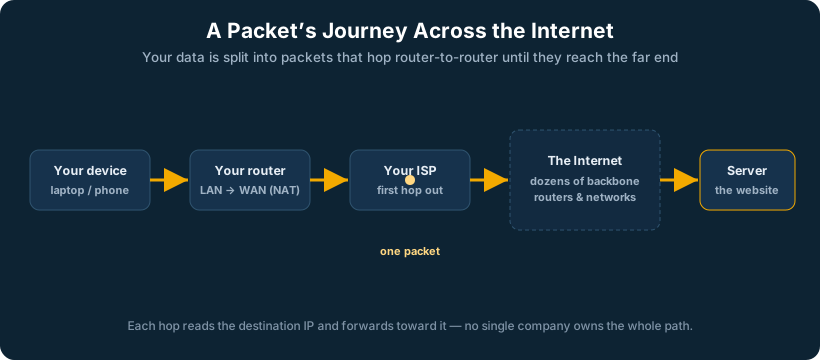
The places where all these networks physically meet are called Internet Exchange Points, or IXPs, and they live inside large, neutral data centers, the carrier hotels. A facility like these is a building where hundreds of networks run fiber into a common meet-me room and cross-connect to one another. When you send a packet from your office to a server across the country, it very likely passes through one or more of these buildings, hopping from your ISP’s network to a transit provider’s to the destination’s.
How it is generally implemented
Networks find each other using a system of autonomous systems. Every significant network on the internet is assigned an Autonomous System Number, or ASN, a unique identifier for a network under one administrative control. Networks announce which blocks of IP addresses they own, and which they can reach, to their neighbors using the Border Gateway Protocol (BGP), which we cover in detail later. The sum of all those announcements is the global routing table: the internet’s master map of who can reach what.
Two networks connect to each other in one of two commercial ways. Transit is when one network pays another to carry its traffic to the rest of the internet. Peering is when two networks agree to exchange traffic directly between their respective customers, usually without money changing hands, because it is mutually beneficial and avoids paying a transit provider. Large content providers and ISPs peer aggressively at IXPs to keep traffic fast and cheap.
Why it matters
When a business’s single internet connection goes down, people say “the internet is down.” It is not. The internet is fine; the one fragile path to it failed. Understanding that the internet is a mesh of many independent paths is the entire conceptual foundation for why diverse, redundant connectivity is not a luxury. The internet was designed to route around damage. Most business edges are designed with a single point of failure that throws that resilience away at the last mile.
Field skill: is it the last mile, or something upstream? When a customer says “the internet is down,” you want to localize the failure in under a minute. Work outward from the device, following the OSI layers:
- Can the device reach its own gateway (ping the .1)? If not, the problem is local, cable, switch, VLAN, Wi-Fi, not the internet at all.
- Can the edge router reach the ISP’s first hop (the next address past your WAN interface)? If that is down, it is your last-mile link or the ISP’s local loop, the most common real cause.
- Can you reach a known public IP by number (ping 8.8.8.8 or 1.1.1.1) but not by name? Then the link is up and it is a DNS problem, not connectivity.
- Can you reach some sites but not others? That points upstream, a transit or peering problem beyond your ISP, which you cannot fix but can confirm with a traceroute showing where the path dies.
The single most useful tool is traceroute: it shows you hop by hop how far traffic gets before it stops, which immediately tells you whether the failure is yours, your ISP’s, or somewhere out in the mesh. On a Peplink edge with multiple WANs, you also get a shortcut, if one WAN is down and another is up, the dashboard shows it directly, and you have just proven it is a last-mile issue on one circuit rather than a real internet outage.
Why doesn’t everyone just peer instead of paying for transit? Peering is only free and worthwhile when two networks exchange roughly balanced, mutually beneficial traffic and both have a presence at the same exchange point. Most networks cannot reach most of the internet through peering alone, you would have to peer with thousands of networks, maintain a presence in many physical locations, and run the equipment for all of it. Transit exists because paying one larger provider to reach everyone is far cheaper and simpler than building direct relationships with everyone. Big networks with lots of traffic and many locations peer aggressively because at their scale it pays off; smaller networks buy transit because at their scale it does not. It is an economic decision about traffic volume and reach, not a technical limitation.
In an SD-WAN world
West Networks runs its own piece of this hierarchy. We hold our own ASN and our own IP address space, and we announce our presence to the internet with BGP, the same way a carrier does. In practice that announcement means we advertise our IP blocks (prefixes) to the providers we connect to, and through BGP’s chain of announcements those blocks become reachable from everywhere; we use a mix of transit (paying upstream providers for full reach) and direct peering where it makes sense, exactly like any network our size.
But where a traditional network picks its path based on how routes are advertised, our SpeedFusion-based backbone selects paths based on the actual, measured, real-time performance of each connection. Here is the distinction in the global routing table: a normal ISP announces its prefixes and the world reaches it over whatever path BGP’s attributes prefer, a path that can be “up” but congested. We announce a stable identity the same way, so to the outside world we look like a consistent, single presence, but underneath that stable front door, our own traffic is continuously steered across multiple diverse links by real-time performance rather than by BGP’s slower, topology-based logic. We combine the stable identity of being our own autonomous system on the internet with the intelligence of SD-WAN choosing the fastest healthy path at every moment. The result is that we participate in the internet’s mesh the way it was meant to be used: never depending on any single path, at any layer.
Part Two: The OSI and TCP/IP Models
The topic
The OSI model is the shared vocabulary of networking. It breaks communication into seven layers, each responsible for one job, so that a problem can be located precisely. From the bottom up: Layer 1 Physical (the actual signal on copper, fiber, or radio), Layer 2 Data Link (frames and MAC addresses, switching), Layer 3 Network (packets and IP addresses, routing), Layer 4 Transport (TCP and UDP, ports, reliability), Layer 5 Session, Layer 6 Presentation, and Layer 7 Application (the data the user actually cares about).
In practice most engineers work with a simplified four-layer TCP/IP model (Link, Internet, Transport, Application), but the seven-layer OSI numbering is how people talk. When an engineer says “that’s a Layer 2 problem” or “we’re load-balancing at Layer 4,” the number tells you exactly where in the stack the behavior lives.
How it is generally implemented
Every piece of network equipment operates primarily at one or two layers. A basic switch is a Layer 2 device: it makes decisions based on MAC addresses. A router is a Layer 3 device: it makes decisions based on IP addresses. A firewall may operate from Layer 3 all the way up to Layer 7, inspecting not just addresses but the application content of traffic. Understanding which layer a device works at tells you what it can and cannot see.
Why it matters
Troubleshooting is fastest when you move up the layers in order. No link light? That is Layer 1, check the cable before you touch anything else. Link is up but no traffic between two devices on the same switch? Layer 2, look at VLANs and MAC tables. Can reach local devices but not across networks? Layer 3, check routing and gateways. The model turns a vague “the network is broken” into a systematic search.
In an SD-WAN world
SD-WAN is interesting precisely because it operates across several layers at once. It makes Layer 3 routing decisions, but it does so based on Layer 4 and even Layer 7 awareness, sending a latency-sensitive voice call (which it can identify by application) down the lowest-latency link while routing a bulk file transfer down the highest-bandwidth one. SpeedFusion adds a capability the classic model never imagined: a single Layer 4 session, a phone call, a video stream, can ride across multiple physical Layer 1 connections at once and survive the loss of any of them.