
Part Seven: NAT (Network Address Translation)
The topic
NAT is the workaround that kept IPv4 alive. Because public addresses are scarce, NAT lets many devices on a private network share one (or a few) public addresses. When an internal device with a private address sends traffic to the internet, the NAT device (usually the router or firewall) rewrites the source address to its own public address, remembers the translation, and rewrites the responses on the way back. To the internet, all the traffic appears to come from one address.
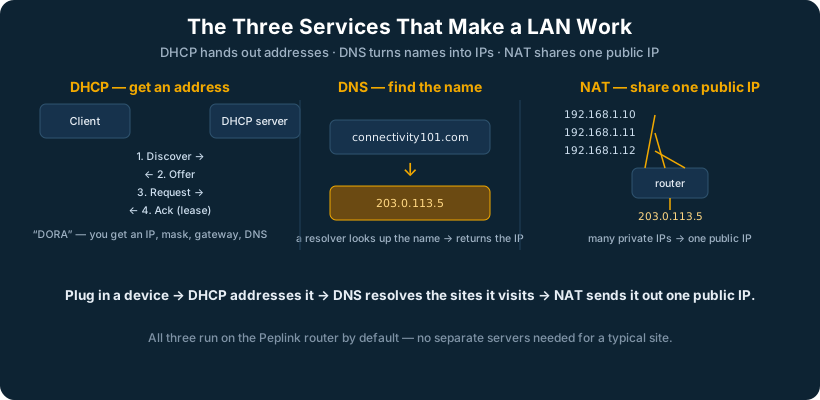
The most common form is PAT (Port Address Translation), often just called “NAT overload,” where the device uses port numbers to keep track of which internal device each conversation belongs to. This is what nearly every home and small-business router does by default.
How it is generally implemented
NAT runs on the gateway device at the network edge. Outbound NAT is automatic on virtually every router. For inbound access, when you need the outside world to reach a specific internal server, you configure port forwarding (a static NAT mapping) or a one-to-one NAT that ties a public address to a private one. Firewalls layer their rules on top of these translations.
Why it matters
NAT is everywhere, and it breaks things. Because it hides internal devices behind a shared address, any protocol that embeds its own address information (some VoIP, some VPN, some peer-to-peer) can misbehave through NAT. A huge amount of real-world network troubleshooting comes down to NAT traversal problems. It is a brilliant hack that the entire IPv4 internet now depends on, and it is also a constant low-grade tax on connectivity.
In an SD-WAN world
NAT gets more complicated with multiple WAN links, each link has its own public address and its own NAT, so a session that moves between links can break. This is one of the clearest arguments for SpeedFusion’s approach: by bonding the links into a single logical tunnel with a stable virtual address, the NAT complexity collapses. Sessions ride the tunnel, not the individual links, so they survive a link change that ordinary multi-WAN NAT would have dropped.
So which public IP does a session use when it is NOT on the tunnel? Plenty of ordinary internet traffic (a user browsing the web) does not need the SpeedFusion tunnel and goes straight out a WAN link. In that case the Peplink edge picks the outbound link according to your outbound policy rules (the algorithms covered in the firewall section, weighted balance, lowest latency, and so on), and the session is NATed to that chosen link’s public IP. The important consequence: once a session starts on a given link, it must stay on that link, because its public IP cannot change mid-session without breaking it. This is exactly what the “persistence” policy is for, it pins a given source or session to one WAN so its NAT address stays stable. The mental model: tunneled traffic gets one stable virtual IP and can roam across links freely; non-tunneled traffic is NATed to whichever single link the policy selected and stays there for the life of the session. When a customer has an application that breaks on multi-WAN, the cause is almost always a session being moved between links (and thus between public IPs), and the fix is a persistence or enforced rule, or putting that traffic on the tunnel.
Part Eight: DHCP and DNS
The topic
These are the two background services that make a network usable for humans. DHCP (Dynamic Host Configuration Protocol) automatically hands a device everything it needs to join the network: an IP address, a subnet mask, a default gateway, and DNS server addresses. Without it, every device would have to be configured by hand. DNS (Domain Name System) is the internet’s phone book: it translates human-friendly names like westnetworks.com into the IP addresses machines actually use.
How it is generally implemented
A DHCP server (running on a router, firewall, or dedicated server) is configured with a scope, a range of addresses it is allowed to hand out, along with the gateway and DNS options to include. When a device connects, it broadcasts a request and the server leases it an address for a set time. DNS works as a hierarchy of servers: a device asks its configured resolver, which, if it does not know the answer, walks up through root servers, top-level-domain servers, and authoritative servers until it finds the address, then caches it for next time.
Why it matters
When DHCP fails, devices cannot get on the network at all. When DNS fails, everything appears broken even though the network is fine, users cannot reach anything by name, even though the underlying connectivity is perfect. “It’s always DNS” is a running joke among engineers precisely because so many mysterious outages trace back to a DNS misconfiguration. These two services are invisible when they work and catastrophic when they do not.
The top three DNS problems you’ll see on tickets. First, wrong or unreachable DNS server: the device was handed a DNS server it cannot reach (an old server, a typo in DHCP options, or a server that is down), so name lookups fail while ping-by-IP works, the textbook “internet is down but isn’t” call. Second, stale or cached records: a site moved to a new IP but the device, the local resolver, or the ISP cache still has the old answer, so the user reaches the wrong place or nothing, fixed by flushing the cache and waiting out the TTL. Third, the split-horizon / internal-name problem: a name that should resolve to an internal address resolves to a public one (or vice versa), common when a customer uses public DNS for internal resources, or when a VPN/SD-WAN path changes which DNS server answers. The fast diagnostic for all three: ping a public IP by number to prove connectivity, then try resolving a name with nslookup against a known-good server like 8.8.8.8, if the IP works and the name fails, it is DNS, and which of the three it is becomes obvious from whether the answer is missing, wrong, or pointed the wrong way.
In an SD-WAN world
In a multi-site deployment, DHCP and DNS need to be consistent and resilient across locations. Centralized SD-WAN management lets these services be defined and monitored from one console rather than configured device by device. And because DNS resolution depends on reaching a DNS server, the link redundancy that SpeedFusion provides directly protects it: if one path to the resolver fails, the query simply takes another, and users never see the “everything is broken” symptom that a DNS-path failure normally causes.