
Manage a group’s wireless centrally. At the group level you set SSIDs, tune every radio at once, and stand up wireless meshing — all assigned by tag so you never have to log into individual devices.
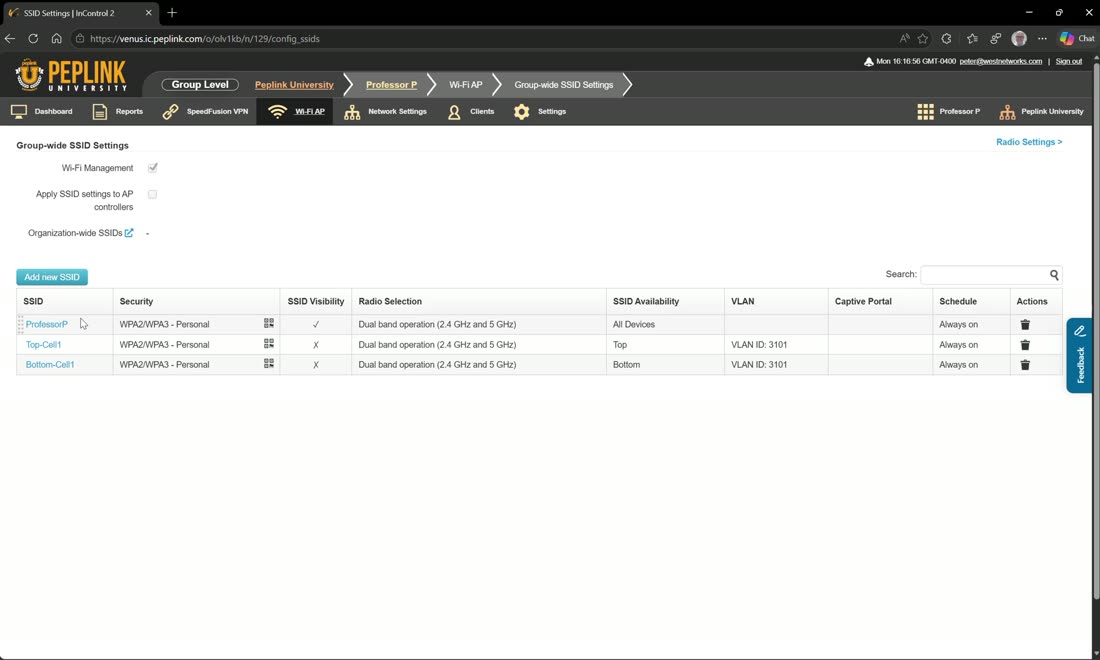
SSID settings push Wi-Fi to devices by tag. In Peter’s lab the routers are labelled top and bottom, each with its own SSID, plus a shared Professor P SSID on both devices — set up that way to demonstrate failover and high availability between the two.
Organization-wide SSIDs
New since 2.12, you can also define an SSID once at the organization level (Wi-Fi AP) and it applies to every Wi-Fi-managed AP in the org — ideal for pushing the same enterprise authentication (e.g. WPA3-Enterprise with your primary RADIUS) everywhere. There is no tag filter at the org level: any SSID defined there goes to all Wi-Fi-enabled devices, and org-level SSIDs are received first, then group- or device-level ones.
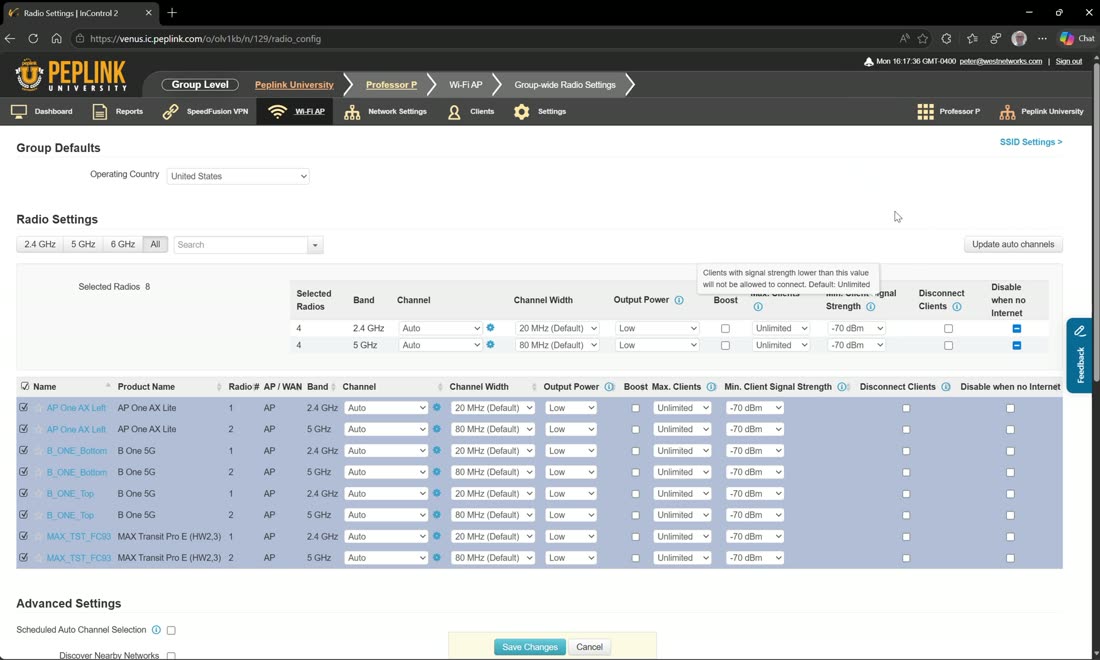
Radio settings tune the whole group at once. Select the devices you want, then set channel width, output power (e.g. drop them all to low), maximum number of clients, and the signal-strength thresholds that drive roaming. Setting a sensible roaming threshold keeps clients handing off cleanly for a consistently good signal; hit save changes and the settings apply across all the selected devices at once.
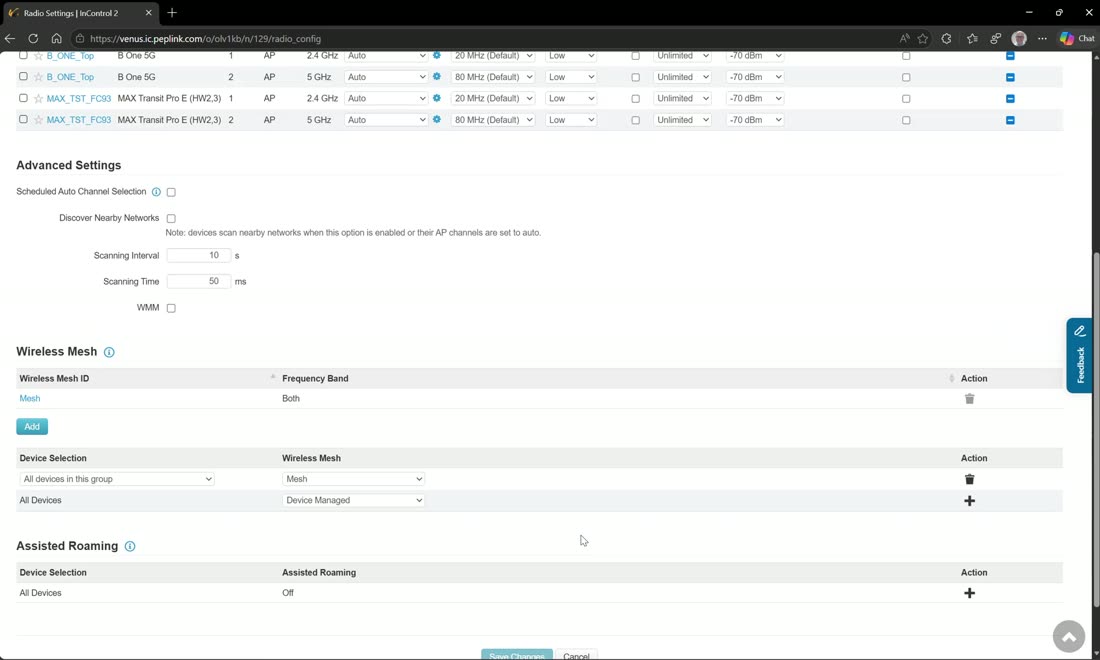
Mesh: click add to create a wireless mesh profile on both frequency bands, then assign that profile to your devices. Any APs or routers in the group are then already provisioned for meshing — anything that is not hard-wired (for example an AP that should back-haul to the top and bottom routers) simply meshes automatically.
SSID settings — every option, explained
Whether you create an SSID at the organization level, the group level, or on a single device, the form is the same one. This is what each setting does and how we set it in the field. Anything marked AP One applies to Pepwave access points only, not to the Wi-Fi built into Balance and MAX routers.
SSID & availability
| Setting | What it does | Field guidance |
|---|---|---|
| SSID | The network name clients see. Up to 32 characters. | One SSID per purpose (staff, guest, IoT, POS), not per building. Renaming forces every client to re-join, so pick a name you can live with. |
| Enable | Turns the SSID on or off without deleting it. | Disable seasonal or event networks instead of deleting them — the settings survive for next time. |
| SSID Availability / Device Selection | Which devices broadcast it: every device in the group, or only devices carrying a chosen tag. | Tag-based is the zero-touch way: tag a new AP lobby and it inherits the lobby SSIDs the moment it comes online. Org-wide SSIDs have no tag filter — they go to every Wi-Fi device in the organization. |
Security settings
| Setting | What it does | Field guidance |
|---|---|---|
| Security Policy | Open (no encryption) · Enhanced Open (OWE) · WPA2 Personal · WPA2/WPA3 Personal · WPA3 Personal · WPA2 Enterprise · WPA2/WPA3 Enterprise · WPA3 Enterprise. Personal = a passphrase; Enterprise = 802.1X against your RADIUS server. Mixed WPA2/WPA3 needs Balance/MAX firmware 8.1.0+ and AP One 3.6.2 / 3.7.1+. | WPA2/WPA3 Personal is the sensible default for passphrase networks (WPA3 for capable clients, WPA2 fallback for the rest). Corporate devices belong on Enterprise so every user is individually authenticated. Never run Open without a captive portal and Layer 2 Isolation. |
| Encryption | The cipher — AES:CCMP on every modern policy. TKIP only appears in legacy WPA modes. | Leave it on AES. If a legacy device demands TKIP, give it its own 2.4 GHz SSID rather than weakening the main one. |
| Shared Key | Static: one passphrase everyone shares. Private Pre-Shared Key (PPSK): each user or device gets its own key on the same SSID. Firmware 8.6 shows the PPSK name next to each client. | PPSK is the answer for IoT, vendors and contractors: revoke one key without touching anyone else, and see who is who in the client list. |
| Management Frame Protection (802.11w) | Disabled (default) · Optional · Required. Signs management frames so an attacker cannot spoof a de-authentication and kick your clients off. | WPA3 requires it. Optional is safe on mixed fleets; Required can stop older clients from joining. |
| Layer 2 Isolation | Stops clients on this SSID from talking to each other. Each client can only reach the gateway and the internet. | On for guest, public, event, vendor and IoT SSIDs. Off for staff SSIDs that need printers, casting or screen-sharing. Full explanation in the callout below. |
| Fast Transition (802.11r) | Pre-shares keys with neighbouring APs so a roaming client re-associates in milliseconds instead of re-authenticating. | On for voice/video handsets, barcode scanners, carts and anything that moves. Off on IoT SSIDs — some older clients refuse to join an 802.11r network. |
Client isolation = Layer 2 Isolation
What it does. With Layer 2 Isolation enabled, the access point refuses to forward frames between wireless clients on that SSID. Phone A cannot ping, scan, AirDrop to, cast to, or attack laptop B — each client can only talk upstream to the gateway and out to the internet. It is a per-SSID checkbox, so your staff SSID can stay open for printers and screen-sharing while the guest SSID next to it is locked down.
When to turn it on. Any network whose users do not trust each other: guest and public Wi-Fi, hotel and venue networks, retail guest Wi-Fi beside a point-of-sale system, clinic waiting rooms, event and conference Wi-Fi, contractor and vendor networks, and most IoT SSIDs (sensors never need to see each other). For guest Wi-Fi it is the single most important checkbox on the form, and it is the first thing a PCI assessor looks for on an SSID that shares hardware with payment devices.
What it does not do. Isolation is enforced by each AP for the wireless clients on that AP, at layer 2 only. Do not assume it spans wired ports or other subnets: a client can still route to your staff VLAN unless you block that too. Belt and braces is the full recipe — own VLAN, Layer 2 Isolation, Guest Protect (block all private IPs and SpeedFusion VPN), and an internal firewall rule. Step-by-step: client isolation on guest Wi-Fi →
Where it lives. InControl: Wi-Fi AP › SSID Settings › open the SSID › Security Settings. Balance/MAX local web admin: AP › Wireless SSID › open the SSID › Security Settings. Same checkbox, same behaviour.
SSID discovery
| Setting | What it does | Field guidance |
|---|---|---|
| SSID Visibility | Show or hide the SSID in the beacon. | Hiding is not security — clients probe for hidden names and leak them, and hidden networks roam worse. Hide only infrastructure SSIDs (mesh backhaul, fixed IoT). |
Guest Protect
Guest Protect is the layer-3 companion to Layer 2 Isolation: isolation stops clients seeing each other; Guest Protect stops them reaching your other networks.
| Setting | What it does | Field guidance |
|---|---|---|
| Block All Private IP | Drops traffic from this SSID to every private range (10.0.0.0/8, 172.16.0.0/12, 192.168.0.0/16). Clients get internet only. | The classic guest switch. Turn it on for every guest and public SSID. |
| Custom Subnet | Extra destinations to block beyond the private ranges. | Use it for a public-IP DMZ, a management range, or a cloud service you do not want guests hammering. |
| Block Exception | Destinations that stay reachable despite the block. | The one printer guests may use, the captive-portal server, a Sonos or casting device in a lobby. Keep the list tiny. |
| Block SpeedFusion VPN | Stops this SSID’s clients riding your SpeedFusion tunnels to other sites or HQ. | On for every guest SSID on a router that has tunnels — otherwise a guest at the branch is one hop from head office. |
VLAN settings
| Setting | What it does | Field guidance |
|---|---|---|
| VLAN Tagging | Tags this SSID’s traffic with a VLAN ID so it lands in its own network. | On Balance/MAX the VLAN must exist under Network › LAN — it becomes the SSID’s subnet, DHCP scope and firewall boundary. On AP One the switch port feeding the AP must trunk that VLAN (the Peplink switch controller and InControl switch management push new VLANs to your switches automatically). Every guest and IoT SSID gets its own VLAN; that is what makes the isolation stick. |
MAC filter
| Setting | What it does | Field guidance |
|---|---|---|
| Restriction Mode | None · Deny all except listed · Accept all except listed. | Convenience, not security: MAC addresses are trivially spoofed and modern phones randomize them per network. Fine for a fixed IoT SSID; use PPSK or 802.1X when you actually need control. |
Multicast settings
| Setting | What it does | Field guidance |
|---|---|---|
| Multicast Filter | Drops multicast and broadcast traffic heading to wireless clients. | Enable on large guest networks to kill mDNS/SSDP chatter and reclaim airtime. Leave off wherever people cast or AirPlay — discovery depends on multicast. |
| Multicast Rate | The data rate multicast frames are sent at (6M up to MCS24). | Higher rate = less airtime per frame but a shorter reach for the clients at the edge. The default mixed list is right for almost everyone. |
| IGMP Snooping | Forwards a multicast stream only to clients that actually joined the group. | On for IPTV, digital signage and video-wall SSIDs; harmless elsewhere. |
Radio selection
| Setting | What it does | Field guidance |
|---|---|---|
| Radio Selection | Which bands broadcast this SSID: 2.4 GHz, 5 GHz, 6 GHz. 6 GHz needs Wi-Fi 6E hardware and WPA3. | Staff and guest: dual band. IoT: 2.4 GHz only — most sensors are 2.4-only anyway and it keeps them off the band you care about. |
| Band Steering | Disable · Prefer · Force. Nudges dual-band clients onto 5 GHz. | Prefer is the safe default: dual-band clients go to 5 GHz but can fall back. Force answers dual-band clients on 5 GHz only — use it in dense venues where 2.4 GHz is a swamp. |
Maximum number of clients
| Setting | What it does | Field guidance |
|---|---|---|
| Maximum Number of Clients | Per-band cap on associated clients, per AP. Default Unlimited. Needs Balance/MAX firmware 7+ or AP One 3.5.4+. | In dense venues cap each radio (40–60 is a common starting point) so clients spill to the neighbouring AP instead of piling onto one. Leave Unlimited on a single-AP site. |
Firewall settings (AP One)
| Setting | What it does | Field guidance |
|---|---|---|
| Firewall Mode | Disabled · Lockdown · Flexible. Per-SSID firewall rules enforced by the access point itself. Lockdown denies everything except your allow rules; Flexible allows everything except your deny rules. | Lockdown a POS or kiosk SSID to just its payment gateway. On Balance/MAX use the router’s internal firewall rules against the SSID’s VLAN instead. |
Schedule
| Setting | What it does | Field guidance |
|---|---|---|
| Schedule | Always on, or a group schedule that switches the SSID on and off by time of day. | Turn guest or classroom Wi-Fi off after hours. Schedules are defined under the group’s Schedules page. |
Captive portal
| Setting | What it does | Field guidance |
|---|---|---|
| Captive Portal | Attach a splash / terms / voucher / RADIUS portal to the SSID. | Applies directly only to AP One. On Balance and MAX, assign the portal to the SSID’s VLAN on the VLAN Networks page instead — see Captive Portals. |
Four SSIDs we build over and over
| SSID | Security | Isolation & reach | Radio & extras |
|---|---|---|---|
| Staff | WPA2/WPA3 Enterprise (RADIUS) — or WPA2/WPA3 Personal on small sites. MFP Optional. | Own VLAN. Layer 2 Isolation off (printers, casting, screen-share). Guest Protect off. | Dual band, Band Steering Prefer, Fast Transition on. |
| Guest | WPA2/WPA3 Personal with a posted passphrase, or Open + captive portal. | Own VLAN. Layer 2 Isolation on. Block All Private IP on. Block SpeedFusion VPN on. Internal firewall rule Guest → any LAN: deny. | Dual band, Band Steering Prefer, per-radio client cap, optional schedule and bandwidth cap. |
| IoT | WPA2 Personal with PPSK (one key per device class). MFP Optional. Fast Transition off. | Own VLAN. Layer 2 Isolation on unless devices must discover each other. Block All Private IP with a Block Exception for their controller. | 2.4 GHz only, hidden if you like, MAC filter as a convenience. |
| POS / payments | WPA2/WPA3 Personal PPSK or Enterprise. MFP Required if the terminals support it. | Own VLAN. Layer 2 Isolation on. AP One Firewall Lockdown (or router rules) to the payment gateway only. Hidden SSID. | 5 GHz preferred, Fast Transition off, client cap = number of terminals. See the PCI DSS guide and Prioritize POS over guest. |
Do it once, push it everywhere
Build these profiles at the group level (or org-wide for the guest SSID) and every AP and router carrying the matching tag receives them the moment it comes online — no per-device login, and a new site opens with isolation already in place.