
Part Three: IPv4 Addressing
The topic
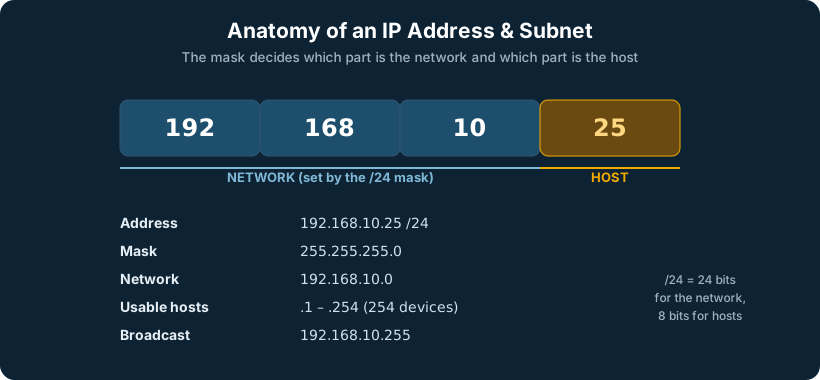
An IPv4 address is a 32-bit number, written as four decimal octets separated by dots, like 192.168.10.25. Each octet ranges from 0 to 255. Every device on an IP network needs a unique address within its scope to send and receive traffic. An address has two parts: the network portion (which network this device is on) and the host portion (which specific device it is). A subnet mask, like 255.255.255.0, is what tells you where the network portion ends and the host portion begins.
Addresses fall into ranges. Public addresses are globally unique and routable on the internet. Private addresses are reserved for internal use and are not routable on the public internet; they are what almost every internal LAN uses. The private ranges are defined by RFC 1918, the single most-referenced table in all of networking:
RFC 1918 private address ranges
| Range | CIDR | Mask | Total addresses | Typical use |
|---|---|---|---|---|
| 10.0.0.0 – 10.255.255.255 | 10.0.0.0/8 | 255.0.0.0 | ~16.7 million | Large enterprises, data centers, the range to use when you want room |
| 172.16.0.0 – 172.31.255.255 | 172.16.0.0/12 | 255.240.0.0 | ~1 million | Mid-size networks; note it is 172.16–172.31, not all of 172 |
| 192.168.0.0 – 192.168.255.255 | 192.168.0.0/16 | 255.255.0.0 | 65,536 | Homes, small offices, the default on most consumer gear |
Alongside these, a handful of other ranges are reserved for special purposes and should never appear as normal host addresses on the internet:
Other special-use IPv4 ranges (the ones you actually meet)
| Range | Purpose |
|---|---|
| 127.0.0.0/8 | Loopback (127.0.0.1 is “this device itself”) |
| 169.254.0.0/16 | APIPA / link-local: a device assigns itself this when DHCP fails. Seeing a 169.254 address is the classic “no DHCP” symptom |
| 100.64.0.0/10 | Carrier-grade NAT (RFC 6598); used inside ISP networks, also common as the Starlink/CGNAT range |
| 0.0.0.0/0 | Default route — “everything not otherwise matched” (a bare 0.0.0.0 also means “this host” / unspecified) |
| 224.0.0.0/4 | Multicast (see the Layer 2 / routing notes) |
| 255.255.255.255 | Limited broadcast |
A quick word on the old “address classes” (Class A/B/C). You will still hear the terms, but classful addressing is obsolete; the entire internet has used classless CIDR since the 1990s. The only place classes still matter is in conversation and in some default behaviors, treat them as historical vocabulary, not a design rule.
How it is generally implemented
A device gets an IPv4 address either statically (manually configured, typical for servers, routers, and infrastructure that must never change) or dynamically (handed out automatically by a DHCP server, typical for end-user devices). The address comes with a subnet mask and usually a default gateway, the address of the router that the device sends traffic to when the destination is on a different network.
Why it matters
IPv4 has a fatal limitation: 32 bits allows only about 4.3 billion addresses, and the world has far more than 4.3 billion connected devices. The public IPv4 space is exhausted. This single fact drove the invention of NAT (covered shortly) and, ultimately, IPv6. Every working engineer still lives in a predominantly IPv4 world, but it is a world running on borrowed time and clever workarounds.
In an SD-WAN world
When a site has multiple internet connections from multiple ISPs, it has multiple public IPv4 addresses, one per link, and they change independently if a link fails. This is a problem for anything that needs a consistent address. SpeedFusion solves it by presenting a single, stable virtual IP to the outside world while the physical connections underneath come and go. The servers and services behind it never see the churn.
Part Four: IPv4 Subnetting
The topic
Subnetting is the practice of dividing a large network into smaller, logical sub-networks. Instead of putting thousands of devices on one flat network (which would be a performance and security nightmare), you carve the address space into right-sized segments. Subnetting is done by “borrowing” bits from the host portion of an address to create more network segments, each with fewer hosts.
Modern notation uses CIDR (Classless Inter-Domain Routing): a slash followed by the number of network bits. /24 means 24 network bits (a 255.255.255.0 mask, 254 usable hosts). /30 means 30 network bits (just 2 usable hosts, perfect for a point-to-point link between two routers). Every time you add one bit to the mask, you halve the number of hosts and double the number of subnets.
This is the table every engineer wants within reach. Usable hosts = total minus two (one for the network address, one for the broadcast), except /31 (used for point-to-point links per RFC 3021) and /32 (a single host route).
The CIDR / subnet mask cheat sheet
| CIDR | Subnet mask | Wildcard | Total addrs | Usable hosts | Common use |
|---|---|---|---|---|---|
| /8 | 255.0.0.0 | 0.255.255.255 | 16,777,216 | 16,777,214 | Whole 10.x private space |
| /16 | 255.255.0.0 | 0.0.255.255 | 65,536 | 65,534 | Large site / whole 192.168.x |
| /20 | 255.255.240.0 | 0.0.15.255 | 4,096 | 4,094 | Large DHCP scope / supernet |
| /21 | 255.255.248.0 | 0.0.7.255 | 2,048 | 2,046 | Large user block |
| /22 | 255.255.252.0 | 0.0.3.255 | 1,024 | 1,022 | Big flat user VLAN |
| /23 | 255.255.254.0 | 0.0.1.255 | 512 | 510 | Double-size user VLAN |
| /24 | 255.255.255.0 | 0.0.0.255 | 256 | 254 | The standard LAN / VLAN |
| /25 | 255.255.255.128 | 0.0.0.127 | 128 | 126 | Half a /24 |
| /26 | 255.255.255.192 | 0.0.0.63 | 64 | 62 | Printers / IoT / small VLAN |
| /27 | 255.255.255.224 | 0.0.0.31 | 32 | 30 | Small office segment |
| /28 | 255.255.255.240 | 0.0.0.15 | 16 | 14 | Tiny segment / DMZ block |
| /29 | 255.255.255.248 | 0.0.0.7 | 8 | 6 | Block of ISP-assigned publics |
| /30 | 255.255.255.252 | 0.0.0.3 | 4 | 2 | Router-to-router point-to-point |
| /31 | 255.255.255.254 | 0.0.0.1 | 2 | 2* | P2P link, no net/bcast (RFC 3021) |
| /32 | 255.255.255.255 | 0.0.0.0 | 1 | 1 | Single host / loopback / route |
The “magic number” method (subnetting in your head). For any mask, the interesting octet’s block size is 256 minus that octet’s mask value. Example: a /26 mask is 255.255.255.192; 256 − 192 = 64, so subnets start every 64 addresses: .0, .64, .128, .192. The network address is the start of each block, the broadcast is one below the next block, and usable hosts are everything between. A /28 gives 256 − 240 = 16, so blocks at .0, .16, .32, .48 and so on. Memorize the block sizes (128, 64, 32, 16, 8, 4, 2) and you can subnet any network without a calculator.
Powers of two (the other table worth memorizing)
| Bits | Value | Bits | Value | |
|---|---|---|---|---|
| 1 | 2 | 6 | 64 | |
| 2 | 4 | 7 | 128 | |
| 3 | 8 | 8 | 256 | |
| 4 | 16 | 9 | 512 | |
| 5 | 32 | 10 | 1024 |
How it is generally implemented
An engineer plans an addressing scheme around how many segments are needed and how many devices live in each. A small office might use a single /24. A larger site segments by function: a /24 for staff, a /24 for guests, a /26 for printers and IoT, a /30 for each router-to-router link. Good subnetting is deliberate; it leaves room to grow and aligns address ranges with VLANs and security zones.
Why it matters
Subnetting is the foundation of both performance and security inside a network. Broadcast traffic stays within a subnet, so smaller subnets mean less noise. More importantly, subnets are the boundaries where firewall and routing policy get applied: you cannot write a rule that says “guests cannot reach the server VLAN” unless guests and servers live in different subnets. Subnetting is where network design becomes security design.
Why a point-to-point link gets a /30 (not something bigger). A link between two routers has exactly two devices on it, one interface at each end. A /30 gives you exactly two usable host addresses, which is precisely what that link needs and nothing more. Using a bigger subnet, say a /24, on a two-device link wastes 252 addresses and, worse, creates a larger broadcast domain than the link requires for no benefit. Right-sizing matters: the discipline of matching the subnet to the actual device count keeps your addressing clean, your routing tables tidy, and your broadcast domains small. (Modern practice often uses a /31 for these links per RFC 3021, squeezing it to just the two needed addresses with no waste at all; a /30 is the traditional, universally-supported choice.)
Doing it in your head on a job site. You rarely need the full cheat sheet once you internalize one trick, the block size. For any mask, the block size in the interesting octet is 256 minus that octet’s mask value. Walk through it live: a customer hands you 10.0.40.0/26. The /26 mask is 255.255.255.192, so 256 − 192 = 64. That means subnets step every 64: .0, .64, .128, .192. So 10.0.40.0/26 covers .0 through .63, the network is .0, the broadcast is .63, and usable hosts are .1 through .62 (that is 62, which is 64 minus the 2 for network and broadcast). Need the next subnet? It starts at .64. That is the entire method: find the block size, count up in blocks, network is the bottom of each block, broadcast is one below the next block. Memorize the block sizes (128, 64, 32, 16, 8, 4, 2) and you can do any IPv4 subnet in your head in seconds.
In an SD-WAN world
Across many sites, subnetting discipline becomes essential, because overlapping subnets are the single most common cause of pain when you connect sites together with VPN or SpeedFusion. If two sites both use 192.168.1.0/24, they cannot route to each other cleanly. A well-run SD-WAN deployment uses a coherent, non-overlapping addressing plan across every site, and centralized management makes that plan visible and enforceable from one place instead of discovering the collision the hard way.
Part Five: IPv6 Addressing
The topic
IPv6 is the long-term fix for IPv4 exhaustion. Instead of 32 bits, an IPv6 address is 128 bits, written as eight groups of four hexadecimal digits separated by colons, like 2001:0db8:85a3:0000:0000:8a2e:0370:7334. That is not a marginal increase; it is roughly 340 undecillion addresses, enough to give every grain of sand on earth its own range many times over. Address exhaustion simply stops being a concept.
IPv6 also simplifies several things IPv4 made painful. There is so much address space that NAT is no longer necessary; every device can have a globally unique address again, restoring the end-to-end model the internet was originally built on. To keep the long addresses manageable, IPv6 allows compression: consecutive groups of zeros can be collapsed to a double colon (::) once per address, so the example above becomes 2001:db8:85a3::8a2e:370:7334.
How it is generally implemented
IPv6 addresses are typically assigned through Stateless Address Autoconfiguration (SLAAC), where a device hears a router advertisement and builds its own address, or through DHCPv6 for environments that want central control. Devices usually hold several IPv6 addresses at once: a link-local address (starting with fe80::, used only on the local segment) and one or more global addresses. Most modern operating systems and networks run IPv4 and IPv6 simultaneously, a configuration called dual-stack.
IPv6 address types and prefixes you will actually see
| Prefix | Type | IPv4 equivalent | Notes |
|---|---|---|---|
| 2000::/3 | Global unicast (GUA) | Public address | Routable on the internet; what carriers delegate |
| fc00::/7 (fd00::/8 in practice) | Unique local (ULA) | RFC 1918 private | Private internal addressing; generate a random /48 |
| fe80::/10 | Link-local | 169.254.x APIPA | Auto-configured on every interface; local segment only |
| ff00::/8 | Multicast | 224.0.0.0/4 | IPv6 has no broadcast; multicast does that job |
| ::1/128 | Loopback | 127.0.0.1 | “This device” |
| ::/128 | Unspecified | 0.0.0.0 | No address yet |
| ::/0 | Default route | 0.0.0.0/0 | “Everything else” |
| 2002::/16 | 6to4 (legacy) | — | Transition mechanism, largely deprecated |
| 64:ff9b::/96 | NAT64 well-known | — | IPv6-only clients reaching IPv4 services |
A useful note: IPv6 has no broadcast at all. Anything IPv4 did with broadcast, IPv6 does with multicast (for example, ff02::1 is “all nodes on this link,” the rough equivalent of a local broadcast).
Why it matters
IPv6 adoption is no longer optional at scale. Major mobile carriers, content providers, and governments increasingly run IPv6-first. For any organization building infrastructure intended to last, ignoring IPv6 means building on a foundation that is already deprecated. The transition is gradual, but the direction is settled.
In an SD-WAN world
IPv6 across a multi-site, multi-ISP deployment introduces real complexity: different carriers delegate address space differently, and maintaining consistent IPv6 reachability across diverse links is non-trivial. This is exactly the kind of problem an SD-WAN overlay is built to abstract away. SpeedFusion can carry traffic across links regardless of the underlying addressing churn, presenting consistent reachability to the sites while the carriers underneath do whatever they do. West Networks treats IPv6 readiness as a core part of modern infrastructure design rather than an afterthought.
Part Six: IPv6 Subnetting
The topic
Subnetting in IPv6 is conceptually the same as IPv4, dividing address space into segments, but it feels completely different in practice because address scarcity disappears. The standard practice is that an end site receives a large block (commonly a /48 from its provider), and within that, each individual subnet is a /64. That /64 is the universal subnet size in IPv6, and it is non-negotiable for features like SLAAC to work.
A /48 contains 65,536 /64 subnets. A single /64 contains 18 quintillion addresses. So IPv6 subnetting is not about conserving addresses, you will never run out, it is purely about organization and hierarchy. You subnet to align with sites, departments, VLANs, and security zones, the same logical reasons as IPv4, without ever doing the host-count arithmetic that dominates IPv4 subnetting.
The IPv6 prefix hierarchy (the only sizes you need)
| Prefix | What it represents | Contains | Who assigns it |
|---|---|---|---|
| /32 | A typical ISP/RIR allocation | 65,536 /48s | RIR → ISP |
| /48 | One end site / organization | 65,536 /64s | ISP → customer (standard site assignment) |
| /56 | A smaller site or one branch | 256 /64s | Sometimes delegated to homes/small sites |
| /64 | One subnet / one VLAN | 18.4 quintillion hosts | The universal subnet size; required for SLAAC |
| /127 | Router-to-router P2P link | 2 addresses | RFC 6164, the IPv6 equivalent of a /30 or /31 |
| /128 | A single host or loopback | 1 address | Host routes, loopbacks |
The rule of thumb is simple: subnet at /64 always, allocate /56 or /48 per site, and never subnet inside a /64. A clean scheme might take a /48, carve a /56 per site, and assign /64s per VLAN within each site, all on tidy hex boundaries.
How it is generally implemented
The design exercise becomes hierarchical and clean. With a /48, an organization might allocate a /56 per site (256 subnets each), and within each site assign /64s per VLAN. Because the boundaries fall on clean hex digits, the plan is far more human-readable than IPv4’s bit-borrowing. The discipline shifts from “how few addresses can I allocate” to “how clearly can I structure this.”
Why it matters
Engineers coming from IPv4 often over-think IPv6 subnetting, trying to conserve addresses out of habit. The mental shift is the lesson: stop conserving, start organizing. A clean /64-per-VLAN scheme is simpler to operate, document, and secure than anything IPv4 forced on you.
If a /64 holds 18 quintillion addresses, why not one giant subnet for everything? Because a subnet is a broadcast (in IPv6, a multicast) domain and a segmentation boundary, not just a pool of addresses. The reasons to keep one /64 per VLAN have nothing to do with running out of space and everything to do with the same things that drove IPv4 subnetting: you want each VLAN to be its own isolated segment so broadcast/multicast traffic stays contained, so security policy has a boundary to enforce (guest cannot reach clinical because they are different subnets on different VLANs), and so the design stays organized and routable. On top of that, IPv6 has a hard technical reason: SLAAC, the autoconfiguration that lets hosts build their own addresses, only works on a /64. Make a VLAN’s subnet bigger or smaller than /64 and SLAAC breaks. So the rule “one /64 per VLAN” is both good design and a protocol requirement. You are not conserving addresses; you are drawing boundaries, and /64 is simply the universal brick you build with.
In an SD-WAN world
A consistent IPv6 subnetting plan across sites pays the same dividend as in IPv4, no overlaps, clean policy boundaries, but with room that never runs out. When West Networks designs an IPv6 plan for a multi-site client, the centralized SD-WAN management means that clean hierarchy is provisioned and visible everywhere at once, so the elegance of IPv6 addressing actually survives contact with a real, growing network.
IPv6 gotchas to watch for early in an SD-WAN deployment. A few things bite teams the first time they run IPv6 over a multi-link, multi-site network, and knowing them up front saves days:
- Prefix delegation differs by carrier, and the prefix can change. Each ISP hands out IPv6 space its own way (different delegation sizes, and many residential or fixed-wireless circuits give you a prefix that can change when the link drops or the lease renews). Because a site may have several ISPs, you can end up with multiple, independently-changing global prefixes. The clean answer is to use stable internal addressing (ULA, fd00::/8) for inside-the-network and between-site communication, and treat the carrier-delegated global prefixes purely as paths out. The SpeedFusion tunnel then carries your stable internal addressing regardless of what the carriers’ prefixes do underneath.
- Do not NAT IPv6 to “fix” multi-homing. The instinct from IPv4 is to NAT everything; resist it with IPv6. NAT66 reintroduces exactly the problems IPv6 was meant to remove. Use ULA internally plus proper routing over the tunnel instead.
- Router Advertisements and SLAAC need a deliberate owner. With IPv6, hosts can auto-configure from any device sending Router Advertisements. In a site with an SD-WAN edge plus other Layer 3 gear, decide explicitly which device is the RA source for each VLAN, or you get devices picking up addresses and gateways you did not intend. A rogue RA is the IPv6 equivalent of a rogue DHCP server.
- MTU and MSS matter more, not less. IPv6 headers are larger and IPv6 routers do not fragment in transit, so the tunnel-overhead math (covered in the MTU/MSS section) is even less forgiving. Make sure MSS clamping is right on the tunnel or you get the classic “pings fine, real traffic hangs” symptom.
- Firewall both families equally. Dual-stack means every security rule needs an IPv6 equivalent. A site can be locked down on IPv4 and wide open on IPv6 simply because someone wrote only v4 rules. Audit both.
- Confirm IPv6 actually rides the tunnel. Verify that IPv6 traffic is taking the SpeedFusion path you expect rather than leaking straight out a raw WAN link, easy to miss when v4 is tunneled correctly and v6 quietly is not.
How often do delegated prefixes actually change, by carrier type? It varies enough that you should design as if it will change:
- Business fiber with a contracted static allocation: rarely or never, this is the stable case, and the prefix is often guaranteed in the contract.
- Residential/SMB fiber and cable: the prefix is usually stable for long stretches but is not guaranteed; it can change on a long outage, a modem swap, or a lease change. Treat it as “usually stable, occasionally not.”
- 5G/LTE: more variable, prefixes can change on reconnect, tower handoff, or session reset, and carrier-grade NAT is common, so a stable, routable delegation is the exception rather than the rule.
- Starlink and similar LEO: typically behind carrier-grade NAT with dynamic addressing; do not count on a stable delegated prefix at all.
The takeaway is the same regardless: use stable internal addressing (ULA) for anything inside your network, and let the SpeedFusion tunnel carry it, so the churn on the carrier side never reaches your hosts.
ULA vs. global (GUA) inside an SD-WAN site, the simple rule. Use ULA (fd00::/8, your own stable private prefix) for everything that talks inside the network or between your sites over the tunnel: management, server-to-server, anything that must keep working no matter what the ISPs do. Use the carrier-delegated global addresses for traffic that goes directly out to the public internet. Many well-run dual-internal designs give hosts both: a ULA address for stable internal reachability and a GUA for direct internet access, with routing preferring the tunnel and ULA for anything internal. This is the IPv6 way to get the stability that IPv4 got from private RFC 1918 space, without resorting to NAT.
“But the customer wants to hide their internal addresses”, how, without NAT? This is a real and reasonable request, and IPv6 has better answers than NAT. First, privacy of addresses on the inside is not what protects you; a stateful firewall is. An IPv6 firewall that denies unsolicited inbound traffic gives you exactly the protection people think NAT provides (NAT was never a security feature, it just happened to block inbound by side effect). Second, if the goal is that internal addressing not be visible or routable from outside, that is precisely what ULA gives you, ULA addresses are not globally routable, so they are inherently private, while a separate global address handles outbound. Third, IPv6 privacy extensions already randomize and rotate the host portion of clients’ public addresses so individual devices are not trivially trackable. Put together, stateful firewall plus ULA internally plus privacy extensions delivers everything the customer actually wants (protection and non-exposure of internal structure) without the session-breaking, troubleshooting-nightmare cost of NAT66.